Cleaning company website with a price calculator
The client picks the type of cleaning, the area and extras, and sees the price at once.
The order with the address and time arrives in your Telegram.
Every other client asks “how much for a two-room flat after renovation”, and I estimate from photos.
Orders come through social media, messengers and the phone. Once we turned up on the wrong day.
Clients ask what a deep clean includes, and I send each of them the same list.
A regular client wants a clean every week, and every time I agree the time all over again.
What we build
Cleaning calculator
Area or number of rooms, type of cleaning, windows, balcony, oven. The price appears at once.
Booking a time
The client picks a date and a free slot and enters the address. Taken slots never show up.
Service checklists
Each service page lists what the cleaning includes and what it does not.
Orders in Telegram
A new order with the address, total and list of jobs goes to you and the team lead.
Regular cleaning
The client picks how often, weekly or every two weeks, and the next orders appear on their own.
Sheet or CRM
Orders go to a Google Sheet, amoCRM or Bitrix24, if the system has an API.
In detail
What pages a cleaning company website needs
- A calculator on the home page: area or number of rooms, type of cleaning, extras. Someone searching for “flat cleaning price per square metre” wants a total, not “price on request”.
- A page for each service: regular cleaning, deep cleaning, cleaning after renovation, window washing, upholstery cleaning. It shows the price and a checklist: what gets cleaned, what does not, how many people come and how long it takes.
- An order form: date, time slot, address, floor and whether there is a lift. A separate field for pets and for how to get into the flat.
- Photos of your staff and your equipment: vacuum cleaners, steam cleaners, an extractor for upholstery. The client lets strangers into their home and wants to see who is coming.
- Reviews. A link to your card on Yandex Maps or 2GIS, where real clients write them, works better than an unsigned review block on the website.
- Regular cleaning. The client picks how often, and orders for the coming weeks appear in the schedule on their own.
How much a cleaning company website costs
| What is included | Price | Time |
|---|---|---|
| Website with services, checklists and a calculator, requests to Telegram | from $190 | 1-2 weeks |
| Website with slot booking, regular cleaning, prepayment and an admin panel | from $1,100 | 4-6 weeks |
| Orders and team schedules in a Google Sheet | from $150 | 1-3 weeks |
The price depends on how ordering works. If the client leaves a request and you agree the time in a chat, a simple website with a calculator is enough. If the client picks a free slot and teams must not overlap, you need a server with a database and a schedule. Online prepayment, a cleaning subscription and a CRM link are estimated separately.
The calculator works like the one in our cleaning demo «Framuga». Each option adds a line, the total is visible at once, and the request arrives with the full breakdown. No more estimating from photos. You change the price per metre, the window extra and the minimum order in the admin panel yourself, without calling a developer. The project price is fixed before we start.
If you do not need a CRM, orders can live in a sheet. Google Sheets automation sorts them by day and team and sends a morning summary. Regular clients can book a repeat clean in Telegram with a booking bot.
How people find a cleaning company in search
People search for cleaning with a city and a price: “flat cleaning Kazan price”, “cleaning after renovation Kazan”, “window washing price”. This is how we build the website for such searches.
- A separate page for each service, with the city in the page title and the h1, for example “Cleaning after renovation in Kazan”.
- Prices as text on the service page: per metre, per room, per window. The calculator is for the client, search engines need text.
- District pages only if the terms there really differ, say a surcharge for trips out of town. Identical pages for every district will not help.
- Yandex Business and 2GIS cards with a link to the calculator and real photos.
- Schema.org markup: the business, services, prices, opening hours.
- Fast loading on a phone. People often order a clean from their phone in the evening, sitting in the flat that needs it.
- Reviews on the maps. After a clean, the client can get a message with a link to your card.
We do not promise rankings or timeframes: they depend on competitors in your city.
Where to start
- Describe in your own words what cleaning you do, how you price it and how many teams you have. No formal spec needed.
- We estimate the complexity and fix the price before we start. Anything beyond the agreement is estimated separately.
- We show a demo with about 40% of the functionality, and you pay only after it. The reasons are in why we take payment after the demo.
- We launch the website and hand over the code and access. For a month after launch we fix texts, colours and pictures for free.
You can describe the task in the request form.
An order holds a name, a phone number and an address, which is personal data. Under Russian law 152-FZ the website needs a privacy policy and a consent checkbox in the form, and we add both from the start. Do not collect door codes or key details in the form, ask the client before the visit.
What it looks like
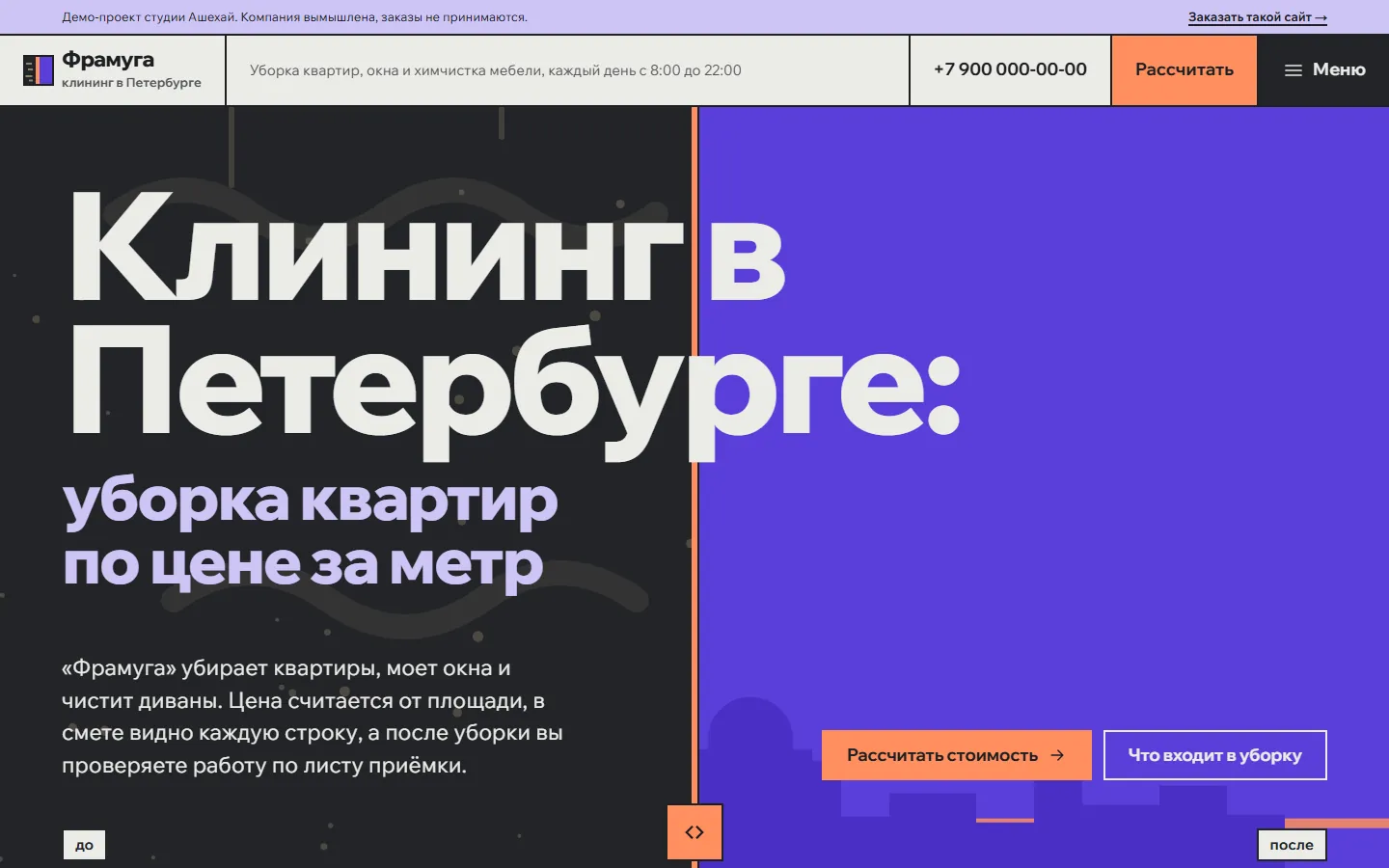
Framuga is a demo cleaning company in St Petersburg. The calculator prices cleaning by area, bathrooms and twelve extras and shows the crew and the time, and every service has a checklist. The company is made up, the calculator works.
Price and timeline
Cost
Website with a calculator
Services, checklists, a calculator, requests to Telegram
from $190
Website with booking and a schedule
Time slots, regular cleaning, prepayment, an admin panel
from $1,100
Orders to a sheet
Orders and team schedules in a Google Sheet
from $150
Timeline
Demo in 1-3 weeks, launch in 2-6 weeks
Prices are a guide. We name the exact amount after a conversation and fix it before we start.
How we work
-
Payment after the demo
We invoice once we show a demo with about 40% of the functionality done.
-
We do the estimate
We assess the complexity and the progress ourselves and explain how we counted.
-
A month of free fixes
For a month after launch we fix small things for free, as long as they add no new features.
-
Your code, your access
You get the source code and access to the server, the bot and the admin panel. Nothing ties you to us.
Questions
Can we change the price per square metre and the extras ourselves?
Yes. With an admin panel, the price per square metre, extras for windows and balcony and the minimum order change in the browser. On a simple website we change prices for you, free for the first month after launch.
Can we take prepayment on the website?
Yes. We connect payments through your acquiring or a payment service. Prepayment can be switched on for some services only, for example cleaning after renovation.
Will orders go to our CRM?
If the CRM has an API, we connect it, and amoCRM and Bitrix24 both have one. Without a CRM, orders land in a Google Sheet and in Telegram.
What about hosting and the domain?
The server and the domain are registered in your name, and you pay the provider directly. A cleaning company website runs fine on an inexpensive server, and we help you pick one.
How will clients find the website?
Service pages, prices in plain text and search markup come with the website, and we add the link to your Yandex Business and 2GIS cards. We do not promise rankings. Ads can be added later as separate work.
Tell us about the task
In your own words, no spec needed. We reply within a working day with a price.
Discuss a project