Accounting firm website with tax articles and a fee calculator
A website for an accountant or an accounting firm that answers business owners’ tax questions and works out the monthly fee.
The request arrives in your Telegram with the business form, tax regime and estimate.
Clients come through recommendations and nobody comes from search. Yandex does not show my three-page website.
Every new client asks what bookkeeping costs, and I ask for a bank statement just to name a figure.
In January and April everyone asks the same things: deadlines, contributions, how to reduce the tax. I answer it ten times in a messenger.
I want to write articles, but I do not know what about, and I worry about leaving last year’s rate on the website.
What we build
Articles for real queries
Tax and bookkeeping guides on topics from Yandex and Google suggestions: what a sole trader pays, patent or simplified system, how to close a business.
Fee calculator
Sole trader or LLC, tax regime, employees, number of transactions, VAT and marketplaces. The monthly fee is itemised line by line.
Service pages
Bookkeeping for sole traders and LLCs, nil returns, restoring records, payroll. Each page lists the work and the price.
Sources and a date
Every article shows a “current as of” date and its primary sources: the Tax Code, nalog.gov.ru, regional laws.
Requests in Telegram
A request arrives with the business form, tax regime and the calculator estimate. It can also go to email or a CRM.
Light pages
Pages are built into static HTML, and only the calculator needs a script. Articles read well on a phone.
In detail
What pages an accounting firm website needs
- A home page: what you handle and for whom, sole traders or LLCs, which tax regimes, whether you work with marketplace sellers. The monthly “from” price is visible at once, not after a call.
- A price page with a table and a calculator. Someone searching for “accountant for a sole trader price” wants a figure for their own case: regime, employees, number of payments.
- A page for each service: bookkeeping for sole traders, bookkeeping for LLCs, nil returns, registration, restoring records, payroll. It shows the scope of work, what you need from the client and the price.
- An articles section with categories. It is the main source of visitors from search, more on that below.
- How you work: how documents are handed over, who files the returns, who answers for mistakes. “Who is liable for an accountant’s mistakes” shows up in search suggestions, and people ask it before sending a request.
- Questions and a request form. The form asks for the business form, tax regime and rough number of transactions, so you can reply with a price in your first message.
How much an accounting firm website costs
| What is included | Price | Time |
|---|---|---|
| Website with services, prices and a calculator, requests to Telegram | from $190 | 1-3 weeks |
| Website with an admin panel: you edit articles, services and prices, requests are stored in a database | from $1,100 | 4-6 weeks |
| Clients, filing deadlines and reminders in a Google Sheet | from $150 | 1-3 weeks |
The price depends on who will keep the website up to date. Rates, thresholds and the minimum wage change every year. If you want to edit articles and prices yourself, you need a website with an admin panel and a database. If we make the edits once a year, a static website is enough. Articles, a client account for documents and a CRM link are estimated separately.
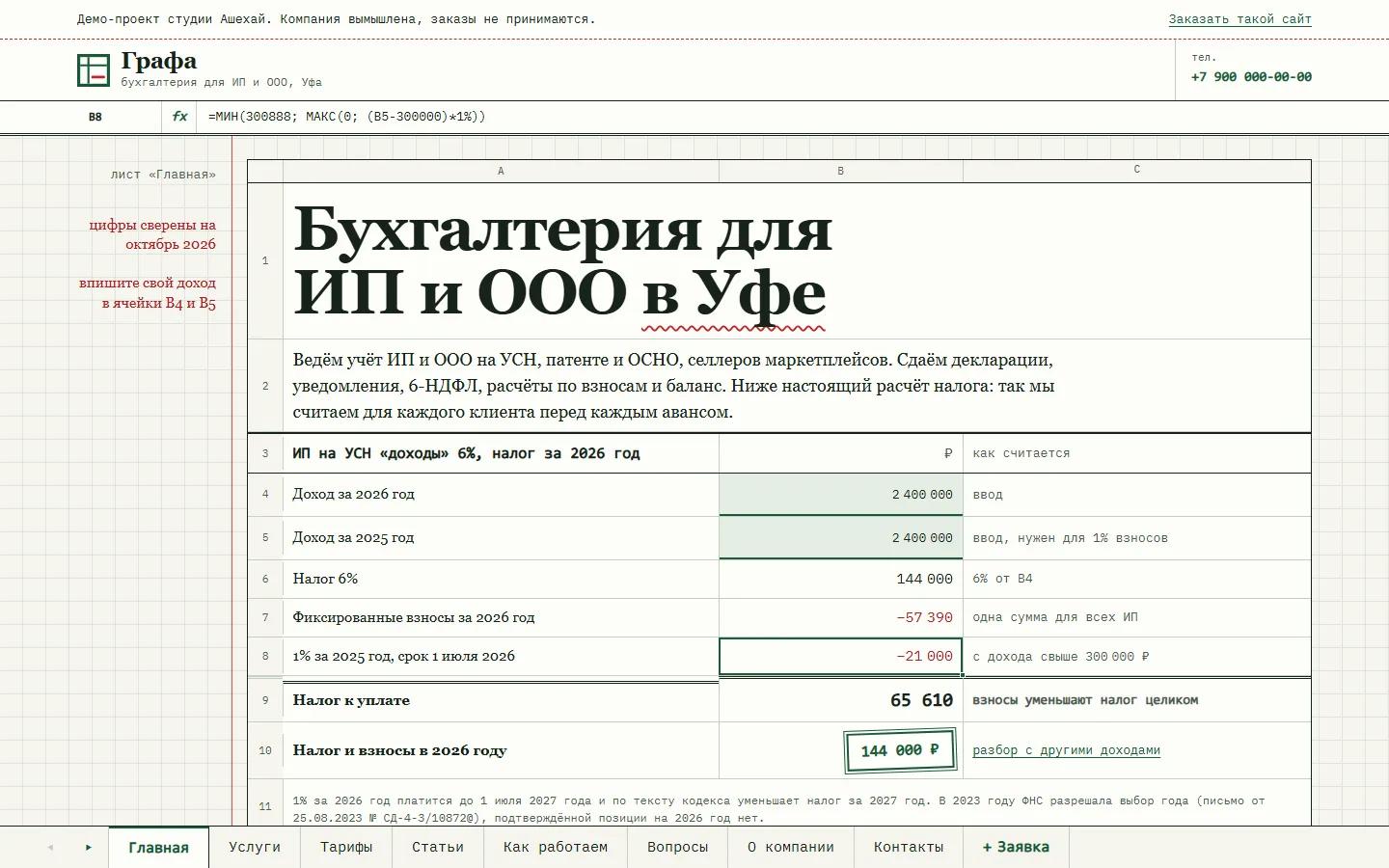
You can see how it works in our accounting demo «Grafa»: a site laid out as a spreadsheet with sheets, 14 tax articles, 8 service pages and a fee calculator. The calculator itemises the monthly fee in cells and carries the estimate into the request form. The firm there is made up, the tax figures are real. The price of your project is fixed before we start.
Client filing deadlines can live in a sheet: Google Sheets automation reminds you whose return or notice is due next week. Clients can book a consultation through a booking bot.
Why an accounting firm needs tax articles
People rarely search for an accountant by name. A business owner first looks for an answer: how much to pay, when to file, which regime is cheaper. A website that answers clearly and with the sums worked out earns trust before the person decides to outsource their books. A short website with a home page and a price list does not take part in that search.
We take topics from Yandex and Google suggestions. They show how people phrase the question: with the year, with endings like “without employees”, “payment deadlines”, “in a table”. One main query gets one article, and its variants become the article’s sections. We check figures against primary sources: the Tax Code on pravo.gov.ru, nalog.gov.ru, your regional laws. Every article has a “current as of” date and a list of sources. Anything we could not confirm gets a caveat or stays out.
Articles are estimated separately, by number and length. For example, 12-16 articles add 1-2 weeks to the project. If you write them yourself, we give you a list of topics with queries and lay out the finished texts. A law firm website works the same way, with articles on contracts and disputes.
How people find an accounting firm in search
For “accounting Ufa” Yandex mostly suggests the accounts offices of universities and public bodies. So commercial pages use general wording plus the city, such as “bookkeeping for a sole trader” or “cost of bookkeeping for a sole trader on the simplified system”. Informational queries are more numerous, and almost all of them carry the year: “sole trader taxes on the simplified system 2026”, “accountant’s calendar 2026”. This is how we build the website for such searches.
- A separate page for each service, with the city in the page title and the h1, for example “Bookkeeping for sole traders in Ufa”.
- Prices as text on the price and service pages. The calculator is for the client, search engines need text.
- The year in the title of articles whose figures change every year, and an update of those articles in January.
- Internal links: an article links to related articles and to the matching service, a service links to articles. No page is left without incoming links.
- Schema.org markup: FAQPage for questions, BlogPosting for articles, breadcrumbs.
- Yandex Business and 2GIS cards with a link to the price page.
We do not promise rankings or timeframes: they depend on competitors in your city.
Where to start
- Describe in your own words who your clients are, what services you offer and how you price them. No formal spec needed.
- We estimate the complexity and fix the price before we start. Anything beyond the agreement is estimated separately.
- We show a demo with about 40% of the functionality, and you pay only after it. The reasons are in why we take payment after the demo.
- We launch the website and hand over the code and access. For a month after launch we fix texts, colours and pictures for free.
You can describe the task in the request form.
Tax articles are for reference, and each article page says it is not a consultation. It is better not to promise things like “we will halve your taxes” or “no fines” on the website: the result depends on the client’s own documents. A request holds a name, a phone number and details of the business. Under Russian law 152-FZ the website then needs a privacy policy and a consent checkbox in the form. We add both from the start.
What it looks like
Grafa is a demo accounting firm for sole traders and LLCs in Ufa, built as a spreadsheet: sections are sheets along the bottom, a formula bar sits on top, and the tax and the monthly fee are worked out right in the cells. Underneath are ordinary pages at their own addresses and 14 tax articles with figures checked in October 2026. The firm is made up, the tax figures are real.
Price and timeline
Cost
Website with services and a calculator
Services, prices, a calculator, requests to Telegram
from $190
Website with an admin panel
You edit articles, services and prices, requests are stored in a database
from $1,100
Clients and deadlines in a sheet
Clients, filing deadlines and reminders in a Google Sheet
from $150
Timeline
Demo in 1-3 weeks, launch in 2-6 weeks
Prices are a guide. We name the exact amount after a conversation and fix it before we start.
How we work
-
Payment after the demo
We invoice once we show a demo with about 40% of the functionality done.
-
We do the estimate
We assess the complexity and the progress ourselves and explain how we counted.
-
A month of free fixes
For a month after launch we fix small things for free, as long as they add no new features.
-
Your code, your access
You get the source code and access to the server, the bot and the admin panel. Nothing ties you to us.
Questions
Who writes the articles, you or us?
Either works. We pick topics from Yandex and Google suggestions, write the articles and check the figures against primary sources, and you read and correct them as the specialist. If you write them yourself, we give you a list of topics with queries and lay out the finished texts.
What happens to the articles when rates and thresholds change in January?
Figures in tax articles go out of date every year. With an admin panel you edit an article yourself and change its “current as of” date. We can take on the yearly update too, estimated separately by the number of articles.
Can we change the prices in the calculator ourselves?
Yes. With an admin panel, the base price per regime and the extras per employee and per transaction band change in the browser. On a simple website we change prices for you, free for the first month after launch.
Can clients have an account to upload documents?
Yes. That is a website with a server and a database: the client uploads bank statements and invoices and sees which returns have been filed. The account is estimated separately, and it often makes sense as a second stage after launch.
How will clients find the website?
Through articles written for queries from search suggestions, service pages with the city in them and search markup. We add the link to your Yandex Business and 2GIS cards. We do not promise rankings.
Tell us about the task
In your own words, no spec needed. We reply within a working day with a price.
Discuss a project