Fulfilment company website with a cost calculator and supply schedule
A fulfilment company website prices one unit by volume, packaging, labelling and marketplace warehouse.
The request with the breakdown arrives in your Telegram, and guides bring sellers in from search.
Every new seller asks what one unit will cost, and I work it out from ten lines of the price list in Excel.
Clients message the manager to ask when the next run to Koledino leaves and whether their batch will make it.
Our price list is a PDF. Half the calls start with whether the barcode is included in packaging.
Beginners do not know how FBO differs from FBS, and we explain it from scratch every time.
What we build
Per-unit calculator
Volume, units per box, packaging, labelling, storage, supplies. Every operation on its own line, the volume discount visible at once.
Supply schedule
Days and times of runs to Wildberries, Ozon and Yandex Market warehouses for the week and the month, with a marketplace filter.
Warehouse pages
One for each marketplace warehouse you deliver to: where it is, how far from you, which days the run goes.
Services and prices as text
Receiving, labelling, packaging, storage, FBO and FBS assembly. What is included, what the seller provides, the price per unit.
Guides for sellers
Topics from Yandex and Google suggestions, facts checked against primary sources, a date and a source list on every guide.
Requests in Telegram
The request reaches the manager together with the calculator breakdown. A copy can go to a Google Sheet or a CRM.
In detail
What pages a fulfilment company website needs
- A calculator: units per month, units per box, packaging, labelling, storage, how many supplies and to which warehouse. A seller searching for “how much does fulfilment cost per unit for Wildberries” wants a price per unit, not “on request”.
- Prices as text: receiving, barcode, Chestny Znak, each type of packaging, storage per box or pallet, FBO supply assembly, FBS order assembly, the minimum bill.
- A page for each service: what is included, how long it takes, what the seller provides and what it costs.
- A supply schedule: days and times of runs to marketplace warehouses and the cut-off hour for goods to make each run.
- A page for each marketplace warehouse you deliver to, such as Koledino or Khorugvino. Where it is, how far from you, which days the run goes.
- Guides for sellers: getting started on Wildberries and Ozon, FBO or FBS, packaging, labelling, fines for supplies.
- About the warehouse: floor area, zones, equipment, photos of the real warehouse and the shift. A seller leaves all their stock with you and wants to see where it will sit.
- A request form: marketplace, FBO or FBS, volume, whether labelling is needed. The calculator breakdown attaches to the request on its own.
How much a fulfilment company website costs
| What is included | Price | Time |
|---|---|---|
| Website with services, prices, a calculator and a run schedule, requests to Telegram | from $190 | 2-3 weeks |
| Website with an admin panel: you change rates, runs and guides, requests are kept in a database | from $1,100 | 4-6 weeks |
| Requests, batches and the run schedule in a Google Sheet | from $150 | 1-3 weeks |
The price depends on who changes rates and runs and what the seller sees. If the price list changes once a quarter and we make the edits, a static website with a calculator is enough. If your manager changes prices and the schedule, you need an admin panel with a database. Guides and a seller account with stock from your warehouse software are estimated separately.
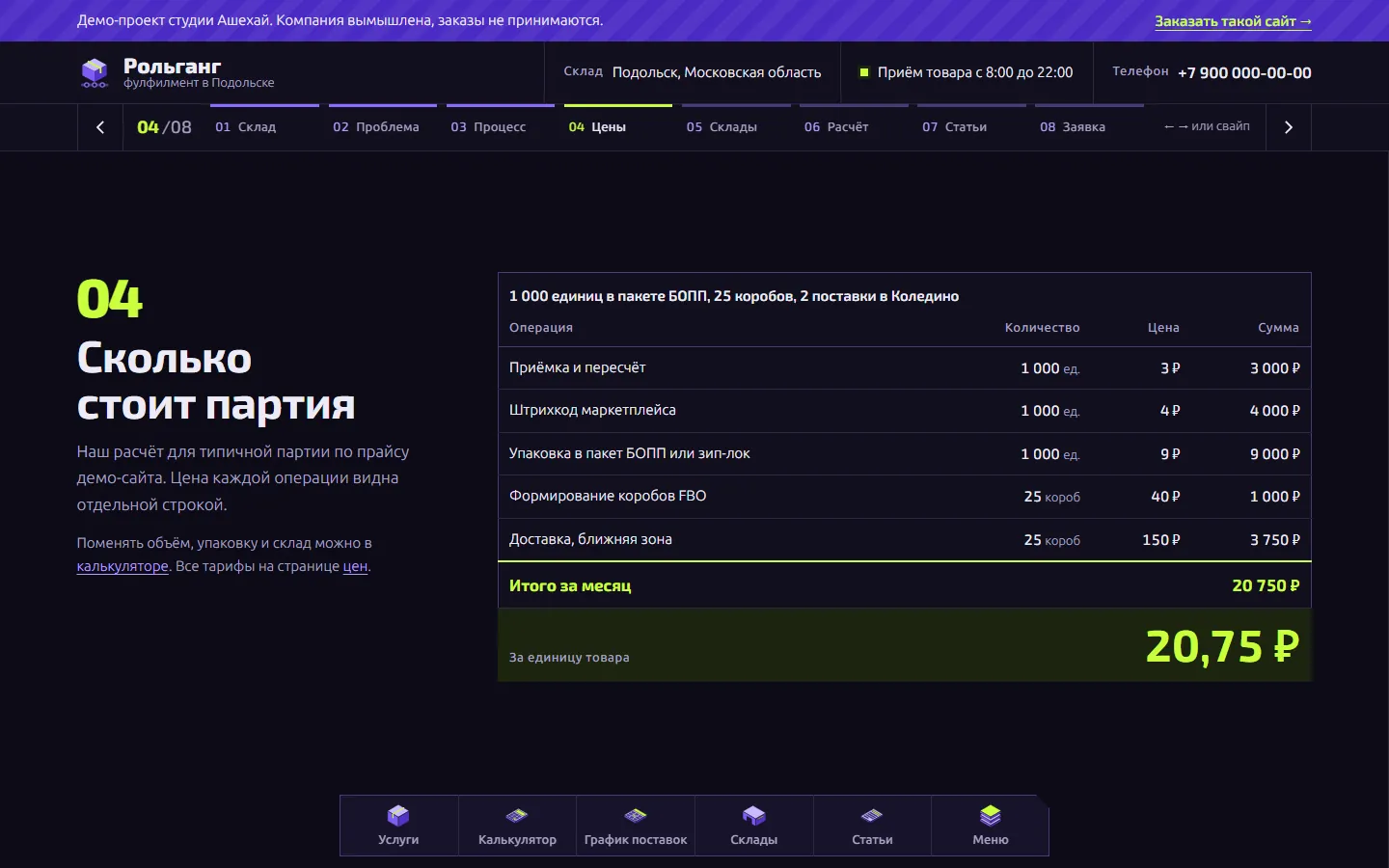
This is how our Rollgang fulfilment demo in Podolsk works. The calculator shows every line: receiving, barcode, packaging, supply assembly, the run and the volume discount. The same code works out the prices slide on the home page when the site is built, so the figures on different pages always match. The project price is fixed before we start.
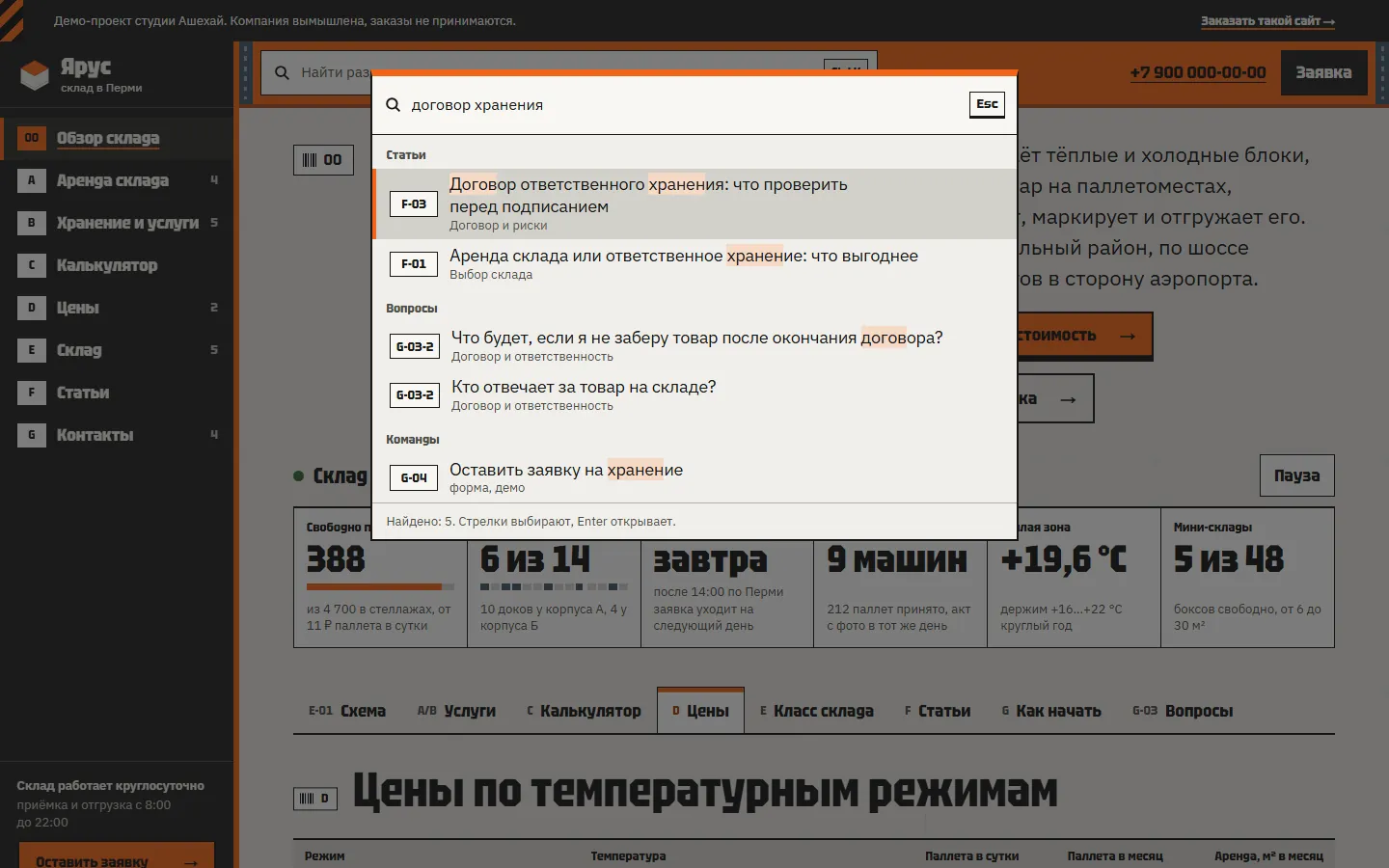
The same layout suits a storage warehouse. There the calculator counts pallet places or square metres for a number of months, and the guides are written for goods owners. An example is the Yarus warehouse in Perm. If requests and batches are easier to keep in a sheet, Google Sheets automation sorts them by day and sends a morning list of receipts and runs.
Why a fulfilment website needs guides for sellers
There are few searches for fulfilment with a town name in them, and every warehouse in the region competes for them. Sellers ask far more questions before they need a warehouse at all. For example, “how to start selling on Wildberries from scratch”, “FBO or FBS, which is better for a beginner” or “which goods need Chestny Znak labelling”. A guide that answers such a question properly brings a future client to the website.
We take topics from Yandex and Google suggestions: a script collects them for a list of seed phrases, and we keep the ones that relate to your work. News tails such as warehouse fires are dropped. Facts are checked against primary sources: marketplace help pages, the Chestny Znak operator’s website, the Tax Code. Each guide carries an “up to date as of” date and a source list, and marketplace fees are marked as approximate. Wildberries and Ozon rules change, and the date tells the reader when the text was checked.
Guides are estimated separately, by number and length. 12-16 guides add 1-2 weeks. The Rollgang demo has 14, including the first supply to Wildberries, unit economics and marketplace fines.
How people find a fulfilment company in search
People search for fulfilment with a town, a marketplace and a price: “fulfilment Podolsk”, “fulfilment for Wildberries”, “fulfilment service prices”, “Koledino Wildberries warehouse”. This is how we build the website for such searches.
- The town and the marketplaces in the home page title and the h1, for example “Fulfilment in Podolsk for Wildberries, Ozon and Yandex Market”.
- A separate page for each service: labelling, packaging, storage, FBO and FBS assembly, delivery to warehouses.
- Pages for the marketplace warehouses you deliver to. People search for them by name, and a seller on such a page sees your runs straight away.
- Per-unit prices as text on the prices page. The calculator is for the seller, search engines need text.
- Yandex Business and 2GIS cards with photos of the warehouse and a link to the calculator.
- Schema.org markup: the business, breadcrumbs, articles, questions and answers.
- Fast loading on a phone. A page of the demo weighs 86-92 KB.
We do not promise rankings or timeframes: they depend on competitors in your town.
Where to start
- Describe in your own words what operations you do, how you price them and which warehouses you deliver to. No formal spec needed.
- We estimate the complexity and fix the price before we start. Anything beyond the agreement is estimated separately.
- We show a demo with about 40% of the functionality, and you pay only after it. The reasons are in why we take payment after the demo.
- We launch the website and hand over the code and access. For a month after launch we fix texts, prices and pictures for free.
You can describe the task in the request form.
Marketplace fees, logistics and packaging and labelling rules change, so Wildberries and Ozon figures on the website carry the date they were checked and an “approximate” label. A seller leaves a name and a phone number in the request, which is personal data. Under Russian law 152-FZ the website needs a privacy policy and a consent checkbox in the form, and we add both from the start.
What it looks like
Rollgang is a demo fulfilment warehouse in Podolsk whose home page is a pitch for sellers: eight full-screen slides with prices, warehouses and a cost breakdown, turned with arrows or a swipe. The calculator, the run schedule and 14 guides on questions from search suggestions open as plain pages. The company is made up, and the facts in the guides were checked in October 2026.
Fulfilment company website Site format:slide deck
Rollgang
A demo website for Rollgang, a made-up fulfilment warehouse in Podolsk: the home page is a pitch of eight full-screen slides with prices and a cost breakdown, and inner pages are plain documents. It has a calculator, a run schedule and 14 seller guides.
Warehouse website Site format:operator console
Yarus
A demo website for Yarus, a made-up warehouse in Perm, built as a warehouse system console: modules on the left, search with a command palette, status tiles, tables and tabs. Inside are a storage calculator and 14 articles for owners of goods.
Price and timeline
Cost
Website with a calculator
Services, per-unit prices, a calculator, a run schedule, requests to Telegram
from $190
Website with an admin panel
You change rates, runs and guides yourself, requests are kept in a database
from $1,100
Requests to a sheet
Requests, batches and the run schedule in a Google Sheet
from $150
Timeline
Demo in 1-3 weeks, launch in 2-6 weeks
Prices are a guide. We name the exact amount after a conversation and fix it before we start.
How we work
-
Payment after the demo
We invoice once we show a demo with about 40% of the functionality done.
-
We do the estimate
We assess the complexity and the progress ourselves and explain how we counted.
-
A month of free fixes
For a month after launch we fix small things for free, as long as they add no new features.
-
Your code, your access
You get the source code and access to the server, the bot and the admin panel. Nothing ties you to us.
Questions
Can we change the rates and the run schedule ourselves?
With an admin panel, yes. The price of each operation, volume discounts, the minimum bill and run days change in the browser, and the calculator uses the new figures at once. On a simple website we make the changes, free for the first month after launch.
Who writes the guides for sellers?
We do. We collect Yandex and Google suggestions, write the text, check the facts against marketplace help pages, the law and the labelling operator’s website, and add a date and sources. Your manager reads it and corrects anything you do differently.
Can a seller see their stock and receiving status on the website?
It can be built if your warehouse software exposes data through an API or an export. A client account is estimated separately once we see what the system provides.
Does this suit a storage warehouse?
Yes, the structure is the same: services, a calculator, guides for goods owners. The calculator counts pallet places or square metres instead, and the run schedule gives way to receiving and release terms.
How will sellers find the website?
Service and marketplace warehouse pages, prices as text, guides and search markup come with the website, and we add the link to your Yandex Business and 2GIS cards. We do not promise rankings.
Tell us about the task
In your own words, no spec needed. We reply within a working day with a price.
Discuss a project